1
Connect your phone
Scan the QR code or hold your phone near the NFC tag. You don’t need an account.
One visitor puts on a Meta Quest headset and explores the Mediterranean seabed. Another follows along on a tablet, identifying the species the diver spots and working out where they live.
As the diver explores in the headset, the other participants see the same sightings appear on one or more tablets. They sort the species by where they live. Afterwards, the diver can revisit the species they opened in a logbook on their phone for 30 days.
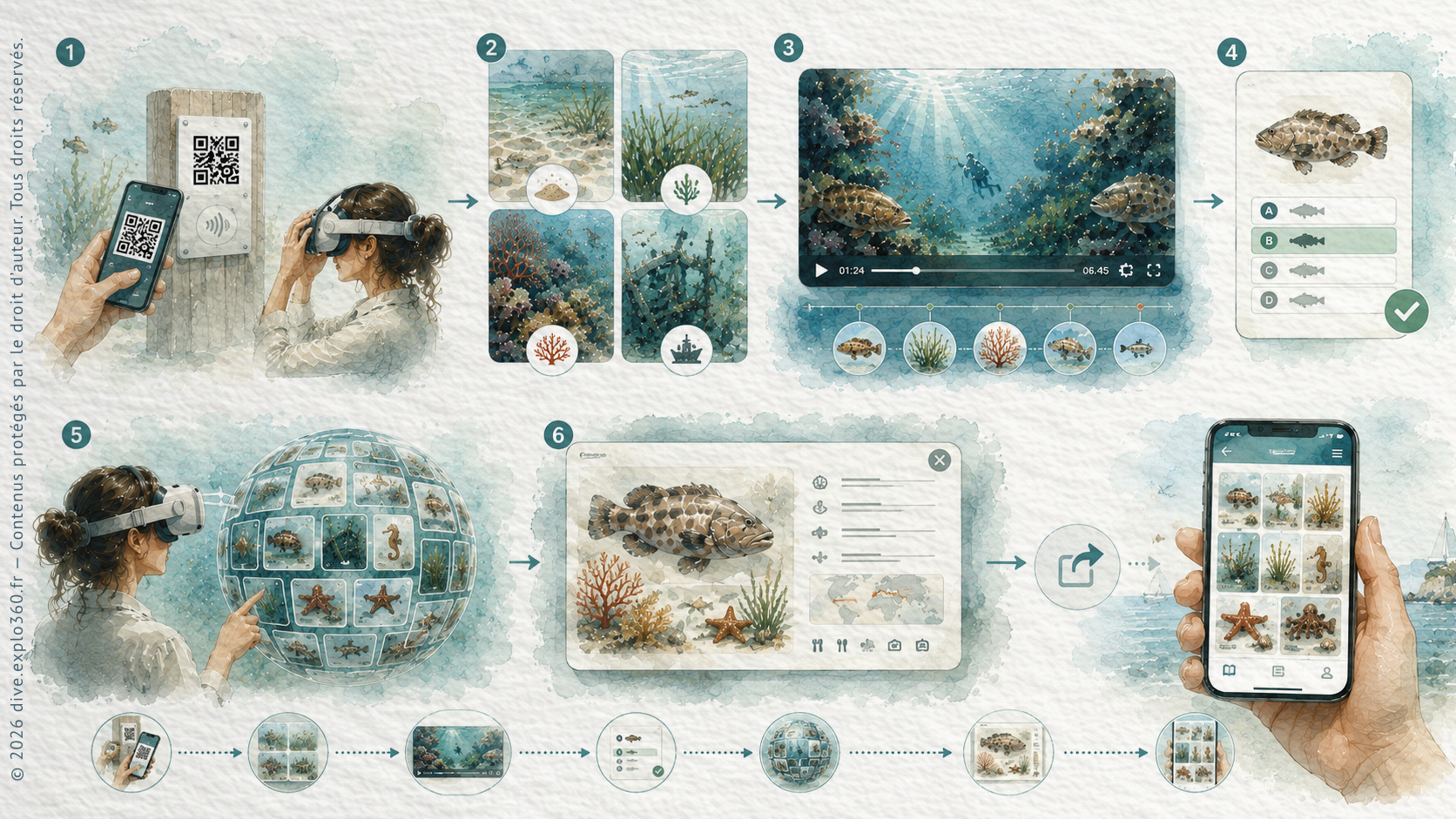
Scan the QR code or hold your phone near the NFC tag. You don’t need an account.
In the headset, choose from four settings: sand, seagrass meadows, coralligenous reefs and wrecks.
Watch real underwater footage and select the species you spot.
Each species the diver spots appears on the tablet. The second participant sorts it by where it lives: at the surface, in open water (pelagic), near the seabed (demersal) or on it (benthic).
After each video, try a multiple-choice quiz about what you saw.
Browse the species from the video as thumbnails arranged in an interactive sphere.
Select a thumbnail for a quick visual guide to the species.
When you leave the experience, the species you opened are sent to your phone.
Reopen the logbook on your phone to read the quick species profiles.
Explore real Mediterranean habitats in the headset and take time to look at the animals you encounter.
The diver spots species in the footage while a partner uses the tablet to decide where each species lives. The sightings appear as the dive unfolds.
Identifying and sorting species helps participants notice which animals share a habitat and where to look for them on another dive.
Visitors can open their species logbook on their phone for 30 days after the session.
Give visitors a close-up look at underwater life as part of an exhibition.
Show how marine animals behave in their natural habitats alongside what visitors see in the tanks.
Introduce visitors to Mediterranean species and the habitats they can find locally.
Offer a marine life activity that visitors can explore at their own pace.
Ask pupils to spot species, identify them together and test what they remember.
Give visitors an underwater activity and a digital logbook to explore afterwards.
Station, Immersion and TV are ways to present the content. The Collectivité licence defines the number of devices and whether visitors are guided.
Immersion: discover together
2 to 5 devices at one site, with a facilitator. For workshops or guided Immersion; unattended access is not included.
View licence and terms6 to 10 devices, for independent and/or guided use. Combine Station, Immersion and TV at one venue; a quote is required for more than 10 devices.
View licence and termsThe chosen presentation format does not replace the licence terms.
Fill in the form to request a demo, try the experience for yourself or discuss using it at your venue.